7 min read
Why I Built Aiduko, an AI Chatbot for Your Content, and How It Works
Aiduko turns websites and documents into AI chatbots that answer with sources. In this article, I share why I built it and give a high-level overview of its architecture: Nuxt layers, a single Postgres database, hybrid search and an API instead of a widget.
Ask my AI assistant
Michael Hoffmann
@mokkapps
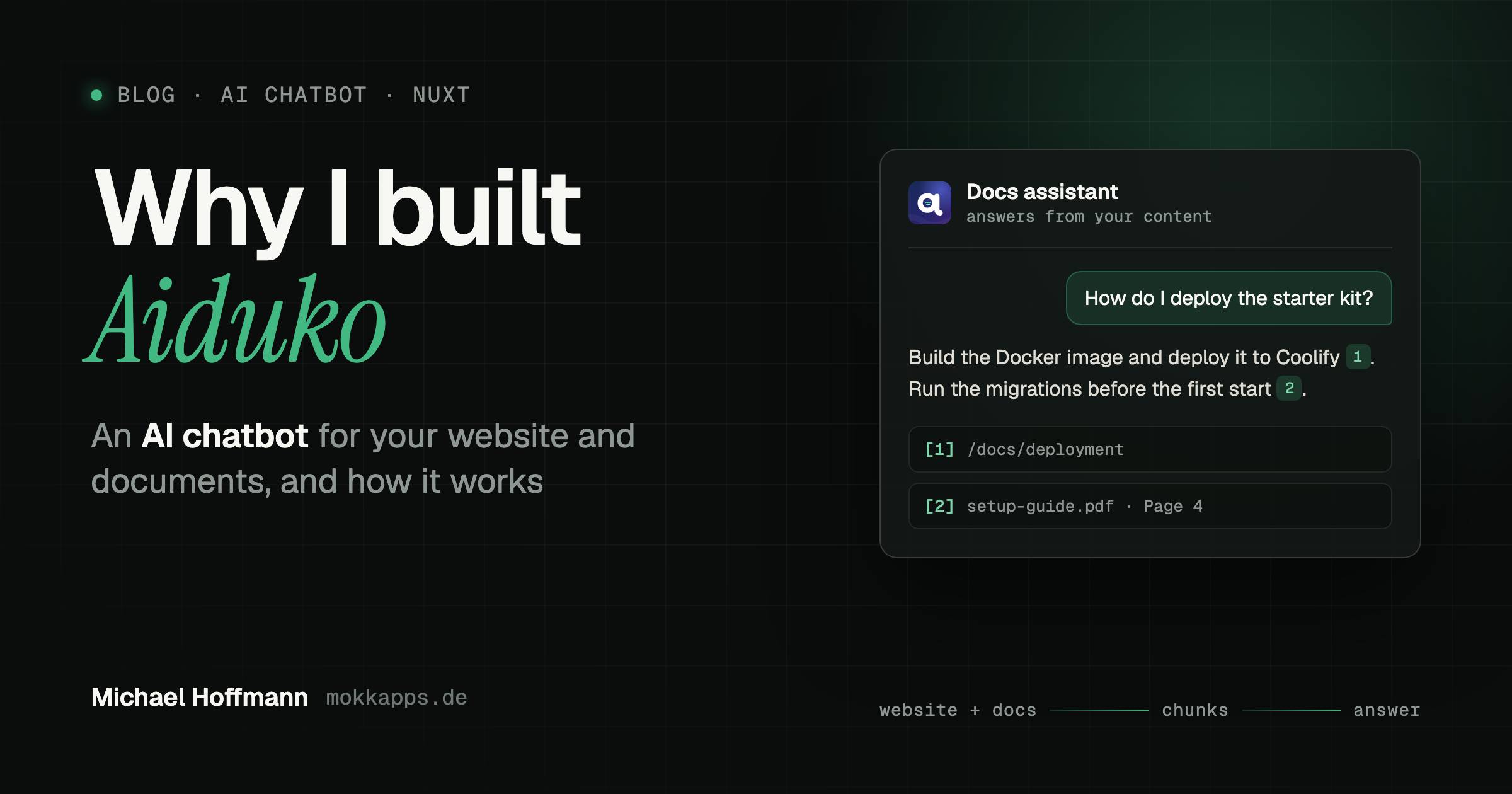
In the last months, more and more of my clients asked me about AI features for their web applications. Most of the time, they wanted the same thing: a chatbot that answers questions about their own content. I had read a lot about RAG (retrieval-augmented generation), but I had never built a real product with it.
So I decided to build one: Aiduko. You add your website or upload documents like PDFs, Aiduko indexes them, and your app gets an API that answers visitor questions from that content. The answers are streamed and link to the pages they are based on.
In this article, I want to share why I built Aiduko and how it works under the hood.
Why I Built Aiduko
My first reason was learning. RAG sounds simple in tutorials: split some text into chunks, create embeddings, find the closest chunks and send them to a model. But a real product raises questions that tutorials skip. Which pages should be indexed? How do I get rid of navigation menus and cookie banners? What happens if a visitor asks "And does it support that?" as a follow-up question? And when should the bot admit that it doesn't know the answer? I wanted to answer these questions in code, not only in theory.
My second reason was my freelance business. If a client asks me about an AI chatbot, I can now show them a running product with a dashboard, billing and a public API, and explain the trade-offs I made while building it.
My third reason was my own websites. This website has a chat that answers questions about my work, and many questions I get by email about my Nuxt Starter Kit are already answered in its documentation. I wanted one service that both websites can use, instead of building a separate chatbot for each of them.
The Big Picture
The following diagram shows the architecture of Aiduko:
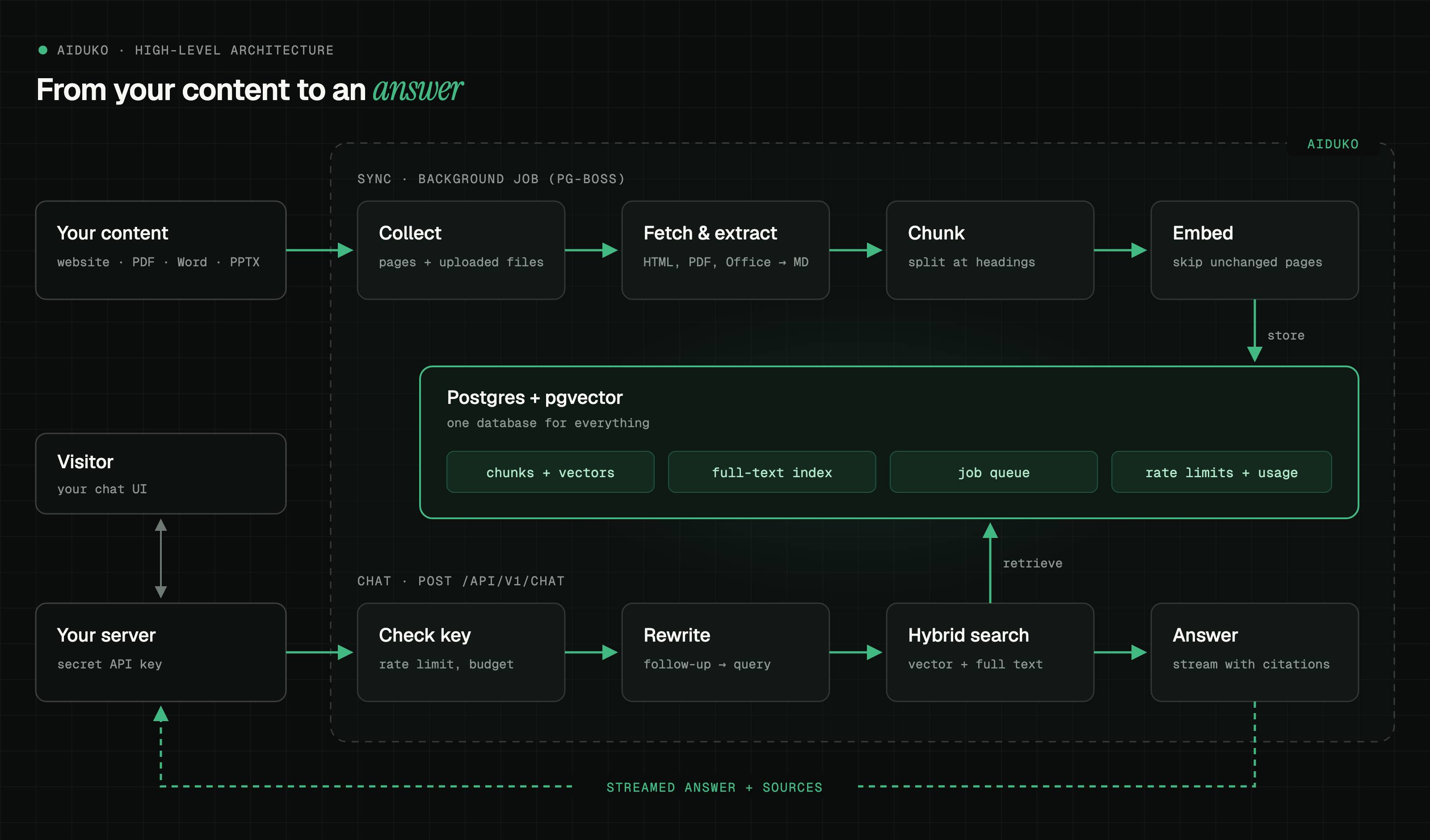
There are two flows. A sync reads your website or your uploaded documents in a background job and stores its content as searchable chunks in Postgres. A chat request comes from your server, finds the chunks that match the question and streams an answer back that cites them.
Built on My Nuxt Starter Kit
I didn't start from scratch. Aiduko is built on my Nuxt Starter Kit, which is a monorepo of Nuxt layers. It already includes authentication with teams (Better Auth), payments with Polar, emails, documentation and an admin dashboard.
On top of that, I added two layers. layer-ai contains everything about the chatbots: knowledge bases, syncing, retrieval, answers, API keys, chat history and usage tracking. layer-ai-saas contains the business part: the Free, Pro and Business plans, team subscriptions with Polar and the billing page.
The two layers only talk to each other through a Nitro hook. If layer-ai needs to know how many pages a team can index, it calls the ai:team-plan hook, and layer-ai-saas answers based on the team's subscription. Without a handler, every team gets a default plan. This way, the RAG code doesn't know anything about Polar, and I could ship layer-ai on its own, for example as part of the starter kit.
One Postgres Database for Everything
Aiduko uses a single Postgres 17 database with the pgvector extension. It stores the chunks with their embeddings, a full-text index on the same chunks, the job queue (pg-boss) and the rate limits of the API keys.
Of course, I could have used a dedicated vector database, Redis for the queue and another store for the rate limits. But each of them is one more service that I need to run, back up and monitor. With Postgres, my deployment on Coolify is one app and one database.
pgvector needs a fixed vector size per column. If I ever switch to an embedding model with other dimensions, I need a migration and have to re-index all knowledge sources.
How Websites and Documents Get Indexed
A sync always runs as a background job and never inside a request. First, Aiduko reads the robots.txt of the website. Then it looks for an llms.txt file, then for sitemaps, and if none of them exist, it crawls the links of the website.
llms.txt turned out to be the best source. Many documentation tools like Nuxt Content, Docus or Mintlify publish it, and it often links to a Markdown version of every page. In this case, Aiduko doesn't need to extract anything from HTML, so there are no menus, footers or cookie banners in the chunks. For normal HTML pages, I use Mozilla Readability to extract the main content and Turndown to convert it to Markdown.
The Markdown is then split at headings into chunks of at most 500 tokens. Each chunk is embedded together with its page title and section heading, so a chunk like "Run pnpm db:migrate" still knows that it belongs to the deployment guide.
If a page hasn't changed since the last sync, it isn't embedded again. Embeddings are cheap anyway: 500 pages are roughly one million tokens, which costs about $0.02. Websites can also be synced automatically every day or every week.
Websites aren't the only knowledge source. A lot of knowledge isn't on a public website at all, for example product manuals, internal guides or presentations. That's why you can also upload documents: PDF, Word, PowerPoint, Markdown and plain text files with up to 20 MB each. The files are stored in a private file storage and go through the same background sync. Aiduko extracts the text as Markdown, keeps the page and slide numbers of PDFs and PowerPoint files, and then chunks and embeds it like a web page. This way, a citation can point to "Page 4" of a PDF instead of a URL.
Customers enter the URLs that Aiduko fetches, so every request goes through one helper that blocks private and internal IP addresses. Otherwise, someone could use the crawler to access services in my own network.
How a Question Gets Answered
If a visitor asks a follow-up question like "And do I get updates for it?", it's a bad search query. That's why Aiduko first uses a small model call to rewrite it into "Do I get updates for Nuxt Starter Kit?", based on the last messages of the conversation.
Then it searches the chunks in two ways. The vector search finds chunks with a similar meaning, even if they use other words. The full-text search finds exact terms like product names, config keys or error codes, which the vector search often misses. Both result lists are merged with Reciprocal Rank Fusion. This algorithm works with the rank of each result instead of its score, because the scores of the two searches can't be compared.
Chunks with a low similarity are removed, even if a keyword matched. If no chunk is left, the model gets no sources and tells the visitor that it doesn't know the answer. I prefer that over a confident guess.
Finally, the model gets the rules (answer only from the sources and cite them as [n]), the numbered sources and the conversation. The answer is streamed back with one source part per cited page.
If an answer is wrong, team owners can correct it in the dashboard. The next time a similar question comes in, the corrected answer is added to the prompt and wins over the website content.
Why Aiduko Has an API Instead of a Widget
Most chatbot tools give you a script tag that adds a chat widget to your website. Aiduko gives you an API instead. Your app calls it from its own server route with a secret API key:
server/api/chat.post.ts
export default defineEventHandler(async (event) => {
  const { chatbotApiKey, chatbotApiUrl } = useRuntimeConfig(event)
  const body = await readBody(event)

  const response = await fetch(chatbotApiUrl, {
    body: JSON.stringify({ id: body.id, messages: body.messages }),
    headers: {
      'authorization': `Bearer ${chatbotApiKey}`,
      'content-type': 'application/json',
    },
    method: 'POST',
  })

  return sendWebResponse(event, response)
})
On the client, you can use useChat from the AI SDK to talk to this route and build the chat UI with your own components. As there is no public browser endpoint, I don't need CORS rules, public bot IDs or domain allowlists. And your server decides how many questions a visitor can ask.
The downside is that you need to write a server route and a chat component yourself. To make this easier, the dashboard provides a prompt that you can paste into Claude Code or Cursor, and the API is documented with OpenAPI and an llms.txt.
Conclusion
I built Aiduko to learn RAG with a real product, to have something I can show my clients and to add chatbots to my own websites. The architecture is deliberately boring: Nuxt layers on top of my starter kit, a single Postgres database, background jobs for syncing websites and documents and an API instead of a widget.
If you want an AI chatbot that answers questions from your own website or documents, you can try Aiduko for free.